type maptype struct { typ _type key *_type elem *_type bucket *_type // internal type representing a hash bucket hmap *_type // internal type representing a hmap keysize uint8// size of key slot indirectkey bool// store ptr to key instead of key itself valuesize uint8// size of value slot indirectvalue bool// store ptr to value instead of value itself bucketsize uint16// size of bucket reflexivekey bool// true if k==k for all keys needkeyupdate bool// true if we need to update key on an overwrite }
// A header for a Go map. type hmap struct { count int// len()返回的map的大小 即有多少kv对 flags uint8 B uint8// 表示hash table总共有2^B个buckets hash0 uint32// hash seed
// A bucket for a Go map. type bmap struct { tophash [bucketCnt]uint8 // Followed by bucketCnt keys and then bucketCnt values. // NOTE: packing all the keys together and then all the values together makes the // code a bit more complicated than alternating key/value/key/value/... but it allows // us to eliminate padding which would be needed for, e.g., map[int64]int8. // Followed by an overflow pointer. }
// makemap implements a Go map creation make(map[k]v, hint) // If the compiler has determined that the map or the first bucket // can be created on the stack, h and/or bucket may be non-nil. // If h != nil, the map can be created directly in h. // If bucket != nil, bucket can be used as the first bucket. // hint是map大小, h过不等于空就直接使用这个hmap, bucket不为空就当做第一个bucket. funcmakemap(t *maptype, hint int64, h *hmap, bucket unsafe.Pointer) *hmap { if sz := unsafe.Sizeof(hmap{}); sz > 48 || sz != t.hmap.size { println("runtime: sizeof(hmap) =", sz, ", t.hmap.size =", t.hmap.size) throw("bad hmap size") }
// hint值不符合规范, 置0 if hint < 0 || hint > int64(maxSliceCap(t.bucket.size)) { hint = 0 } // 按照是否实现hash()来判断是否支持map类型 if !ismapkey(t.key) { throw("runtime.makemap: unsupported map key type") }
// 检查key和value大小 if t.key.size > maxKeySize && (!t.indirectkey || t.keysize != uint8(sys.PtrSize)) || t.key.size <= maxKeySize && (t.indirectkey || t.keysize != uint8(t.key.size)) { throw("key size wrong") } if t.elem.size > maxValueSize && (!t.indirectvalue || t.valuesize != uint8(sys.PtrSize)) || t.elem.size <= maxValueSize && (t.indirectvalue || t.valuesize != uint8(t.elem.size)) { throw("value size wrong") } // 检查各种编译的规范, 跳过 // invariants we depend on. We should probably check these at compile time // somewhere, but for now we'll do it here. if t.key.align > bucketCnt { throw("key align too big") } if t.elem.align > bucketCnt { throw("value align too big") } if t.key.size%uintptr(t.key.align) != 0 { throw("key size not a multiple of key align") } if t.elem.size%uintptr(t.elem.align) != 0 { throw("value size not a multiple of value align") } if bucketCnt < 8 { throw("bucketsize too small for proper alignment") } if dataOffset%uintptr(t.key.align) != 0 { throw("need padding in bucket (key)") } if dataOffset%uintptr(t.elem.align) != 0 { throw("need padding in bucket (value)") }
// 把hint参数对应成2进制的上确界那个数. 例如size=6, B就是3, 因为2^2 < 6 < 2^3 B := uint8(0) for ; overLoadFactor(hint, B); B++ { }
// 使用malloc分配2^B个buckets给h. // allocate initial hash table // if B == 0, the buckets field is allocated lazily later (in mapassign) // If hint is large zeroing this memory could take a while. buckets := bucket var extra *mapextra if B != 0 { var nextOverflow *bmap buckets, nextOverflow = makeBucketArray(t, B) if nextOverflow != nil { extra = new(mapextra) extra.nextOverflow = nextOverflow } }
// initialize Hmap if h == nil { h = (*hmap)(newobject(t.hmap)) } h.count = 0 h.B = B h.extra = extra h.flags = 0 h.hash0 = fastrand() h.buckets = buckets h.oldbuckets = nil h.nevacuate = 0 h.noverflow = 0
// Like mapaccess, but allocates a slot for the key if it is not present in the map. funcmapassign(t *maptype, h *hmap, key unsafe.Pointer) unsafe.Pointer { if h == nil { panic(plainError("assignment to entry in nil map")) } if raceenabled { callerpc := getcallerpc(unsafe.Pointer(&t)) pc := funcPC(mapassign) racewritepc(unsafe.Pointer(h), callerpc, pc) raceReadObjectPC(t.key, key, callerpc, pc) } if msanenabled { msanread(key, t.key.size) } if h.flags&hashWriting != 0 { throw("concurrent map writes") } alg := t.key.alg hash := alg.hash(key, uintptr(h.hash0))
// Set hashWriting after calling alg.hash, since alg.hash may panic, // in which case we have not actually done a write. h.flags |= hashWriting
if h.buckets == nil { h.buckets = newarray(t.bucket, 1) }
again: // 用hash值的低八位找到bucket bucket := hash & (uintptr(1)<<h.B - 1) if h.growing() { growWork(t, h, bucket) } b := (*bmap)(unsafe.Pointer(uintptr(h.buckets) + bucket*uintptr(t.bucketsize))) // 拿到高八位的hash值用于比对tophash top := uint8(hash >> (sys.PtrSize*8 - 8)) if top < minTopHash { top += minTopHash }
var inserti *uint8 var insertk unsafe.Pointer var val unsafe.Pointer for { for i := uintptr(0); i < bucketCnt; i++ { // 遍历tophash, 找到对应的key if b.tophash[i] != top { // 如果没有找到key, 说明是第一次, 将这个key插入到insertk(第i+1个key所在的)的位置, 将value插入到val(第i+1个value所在)的位置, 并且将tophash的当前地址赋值给inserti, 用于记录是否插入以及插入的位置. if b.tophash[i] == empty && inserti == nil { inserti = &b.tophash[i] insertk = add(unsafe.Pointer(b), dataOffset+i*uintptr(t.keysize)) val = add(unsafe.Pointer(b), dataOffset+bucketCnt*uintptr(t.keysize)+i*uintptr(t.valuesize)) } continue } // 如果找到了key的tophash, 就将拿对应的key跟现在的key对比, 看是否相等, 如果不相等就跳过继续找key, 如果相等就更新它的value的值. k := add(unsafe.Pointer(b), dataOffset+i*uintptr(t.keysize)) if t.indirectkey { k = *((*unsafe.Pointer)(k)) } if !alg.equal(key, k) { continue } // 如果需要更新key, 就覆盖key的值. if t.needkeyupdate { typedmemmove(t.key, k, key) } // 返回val的地址, 这个函数并不真正更新value, 只是找到value所在的地址. val = add(unsafe.Pointer(b), dataOffset+bucketCnt*uintptr(t.keysize)+i*uintptr(t.valuesize)) goto done } // 如这个bucket没找到, 找他的overflow链表, 拿下一个bucket循环操作. ovf := b.overflow(t) if ovf == nil { break } b = ovf }
// 如果都没有找到对应的值, 就可能做两件事: // 1) 建立新的overflow, 然后把值加到这个overflow的bucket中. // 2) 如果此时map的len()超过了overLoadFactor(6.5默认值)*桶的数量(2^B, 每个桶最多8个kv), 或者overflow的bucket太多了, golang就会扩大map的容量. // Did not find mapping for key. Allocate new cell & add entry.
// If we hit the max load factor or we have too many overflow buckets, // and we're not already in the middle of growing, start growing. if !h.growing() && (overLoadFactor(int64(h.count), h.B) || tooManyOverflowBuckets(h.noverflow, h.B)) { hashGrow(t, h) goto again // Growing the table invalidates everything, so try again }
if inserti == nil { // all current buckets are full, allocate a new one. newb := h.newoverflow(t, b) inserti = &newb.tophash[0] insertk = add(unsafe.Pointer(newb), dataOffset) val = add(insertk, bucketCnt*uintptr(t.keysize)) }
// store new key/value at insert position if t.indirectkey { kmem := newobject(t.key) *(*unsafe.Pointer)(insertk) = kmem insertk = kmem } if t.indirectvalue { vmem := newobject(t.elem) *(*unsafe.Pointer)(val) = vmem } typedmemmove(t.key, insertk, key) *inserti = top h.count++
done: // 不支持并发map的写. if h.flags&hashWriting == 0 { throw("concurrent map writes") } h.flags &^= hashWriting if t.indirectvalue { val = *((*unsafe.Pointer)(val)) } return val }
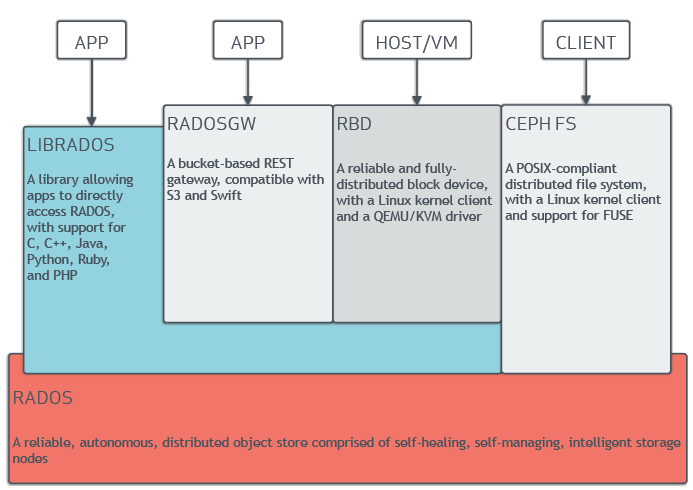
OSD map: 包含集群fsid. a list of pools, replica sizes, PG numbers, a list of OSDs and their status (e.g., up, in).
The PG map: 包含PG version, its time stamp, the last OSD map epoch, the full ratios, and details on each placement group such as the PG ID, the Up Set, the Acting Set, the state of the PG (e.g., active + clean), and data usage statistics for each pool
The CRUSH map: 存储设备列表, 失败的Domain, 已经写入数据的水平路由规则.
The MDS Map: Contains the current MDS map epoch, when the map was created, and the last time it changed
node.kubernetes.io/not-ready: notready. node.alpha.kubernetes.io/unreachable: Unknown node.kubernetes.io/out-of-disk: Node becomes out of disk. node.kubernetes.io/memory-pressure: Node has memory pressure. node.kubernetes.io/disk-pressure: Node has disk pressure. node.kubernetes.io/network-unavailable: Node’s network is unavailable. node.cloudprovider.kubernetes.io/uninitialized: When kubelet is started with “external” cloud provider, it sets this taint on a node to mark it as unusable. When a controller from the cloud-controller-manager initializes this node, kubelet removes this taint.
/usr/bin/docker: Error response from daemon: OCI runtime create failed: container_linux.go:348: starting container process caused "process_linux.go:402: container init caused \"open /dev/console: input/output error\"": unknown. FATA[0007] exit status 125
网上查有如下回复:
1
I met this problem while I suspend my computer, then I restart my computer, this error was solved. I guess it was because the docker daemon missed driver library path.
// os.Rename call fails on windows (https://github.com/golang/go/issues/14527) // Replacing with copyFolder to the newPath and deleting the oldPath directory if runtime.GOOS == "windows" { err = copyFolder(oldPath, newPath) if err != nil { glog.Errorf("Error copying folder from: %s to: %s with error: %v", oldPath, newPath, err) return"", err } os.RemoveAll(oldPath) return newPath, nil }
funcrename(oldname, newname string)error { fi, err := Lstat(newname) if err == nil && fi.IsDir() { // There are two independent errors this function can return: // one for a bad oldname, and one for a bad newname. // At this point we've determined the newname is bad. // But just in case oldname is also bad, prioritize returning // the oldname error because that's what we did historically. if _, err := Lstat(oldname); err != nil { if pe, ok := err.(*PathError); ok { err = pe.Err } return &LinkError{"rename", oldname, newname, err} } return &LinkError{"rename", oldname, newname, syscall.EEXIST} } //------------------------版本分割线1.8 err = syscall.Rename(oldname, newname) if err != nil { return &LinkError{"rename", oldname, newname, err} } returnnil }
在虚线以上是go1.8之后新加的内容, 如果rename之后的目录存在, 就会打印”File Exits”错误, 这样就会创建大量的”deleting~”目录. 相关修改和讨论在Bugs in EmptyDir Teardown path.
shentao@shentao-ThinkPad-T450:~/blog$ type ss-local ss-local is hashed (/usr/bin/ss-local)
可以通过hash命令删除:
1 2 3
shentao@shentao-ThinkPad-T450:~/blog$ hash -d ss-local shentao@shentao-ThinkPad-T450:~/blog$ ss-local -v | grep shadowsocks-libev shadowsocks-libev 2.5.6 with OpenSSL 1.0.1f 6 Jan 2014
知识回顾
我们再来回顾下关于bash 的一些知识:
关于bash可以执行的类型
Aliases: An alias is a word that is mapped to a certain string, 命令的别名.
1
2
$ alias nmapp="nmap -Pn -A --osscan-limit" $ nmapp 192.168.0.1
Functions: A function contains shell commands, and acts very much like a small script. 用function定义一个函数:
1
function gcc { echo “just a testfor gcc”; }
Builtins: 内置函数, cd之类的
Keywords: Keywords are like builtins, with the main difference being that special parsing rules apply to them. For example, [ is a Bash builtin, while [[ is a Bash keyword. They are both used for testing stuff. [[ is a keyword rather than a builtin and is therefore able to offer an extended test:
1
2
3
$ [ a < b ]
-bash: b: No such file or directory
$ [[ a < b ]]
第一个< 是重定向, 第二个加了[[的关键词之后 < 成了小于号.
Executables: (Executables may also be called external commands or applications.) Executables are commonly invoked by typing only their name. This can be done because a pre-defined variable makes known to Bash a list of common, executable, file paths. This variable is called PATH. 外部命令, 也就是PATH中找到的那些命令